How to Stop Emails from Going to Spam in Gmail – Fix Guide


Blog Overview – You hit send on an important email and it lands in spam. Not delivered to inbox, Not read, these are one of the most frustrating things that happens over an email every single day. The question how to stop emails from going to spam in Gmail remains as it is.
Gmail’s spam filter is powerful but it is not perfect. Legitimate emails go to spam in Gmail if a user don’t know why, fixing this becomes challenging. In this guide we will learn why Gmail sends emails to spam and will provide you clear working solutions whether you are sender or receiver.
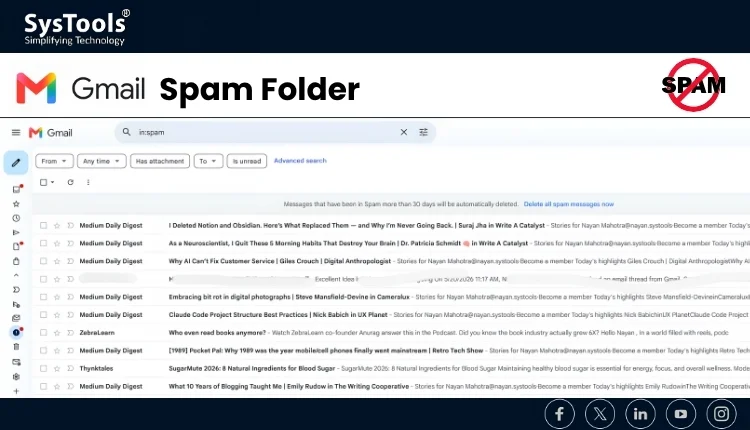
Why Are Your Emails Going to Spam in Gmail?
We can think of Gmail’s spam filter like a strict bouncer at a club. During entry it checks your ID (your domain), scans our outfit (email content) and how other guests reacted to you before (sender’s reputation). If anything feels off balance, you will not get in and will be rejected to spam.
Gmail uses artificial intelligence, machine learning and real user behavior to decide what should belong to your inbox and what shouldn’t. Understanding this is the first step to solve this problem.
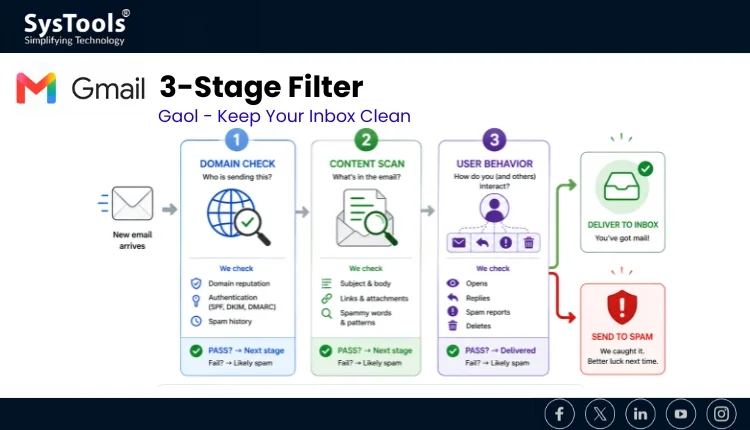
Gmail’s Spam Filter Checks 4 Things
Reasons Legitimate Emails Go to Spam
If your email content has small errors like spelling mistakes, or reads like a sales pitch. Problem can occur as Gmail is trained to treat poorly written emails the same way it treats scam messages. Scammers write this way intentionally. Even accidental grammar mistakes hurt your deliverability.
You may be using a generic short link in your email. Links like bit.ly or tinyurl are red flags for Gmail’s spam filter because spammers use them to hide malicious destinations. Branded domain links or your own links should be used whenever possible.
Your email address has a poor sending history. If people have previously marked emails from your domain as spam. Gmail will remember that, and this reputation follows every future email you send, even to new recipients. These can be the reasons behind your question why are my emails going to spam in Gmail?.
Key Takeaway
One in every five emails gets caught by spam filters globally.
Gmail does evaluation on the basis of domain, content, authentication, and user behavior — all four.
A single weak signal will not always trigger spam, but multiple weak signals always will.
How to Stop Emails from Going to Spam in Gmail
The good news is every cause of the spam problem has a direct fix. The solutions below are organized in the form of the most impactful to the easiest. You can work through them in order and see the results.
Authenticate Your Email Domain (Non-Negotiable)
Email authentication is how can you prove to Gmail that you are who you say you are. Without it, Gmail has no other way to verify your identity and it can treat you like a stranger. Setting up SPF, DKIM, and DMARC tells Gmail that “this email is genuinely from me.”
- SPF (Sender Policy Framework) – Tells Gmail which servers are allowed to send email on behalf of your domain.
- DKIM (DomainKeys Identified Mail) – Adds a digital signature to your email so Gmail can confirm it was not tampered with.
- DMARC – This ties both together and tells Gmail what to do if either check fails.
Action Items
| • | Log into your domain registrar (GoDaddy, Namecheap, etc.) and add SPF and DKIM TXT records. |
| • | Set up a DMARC policy – even a basic “p=none” policy improves Gmail trust significantly. |
| • | Use Google’s free Postmaster Tools to manage and monitor your domain reputation after setup. |
We hope from the information you are getting some clarity on why does Gmail keep sending emails to spam.
Ask Your Contacts to Whitelist Your Email Address
When a Gmail user adds your address to their contacts or moves your email from spam to inbox. Gmail starts learning that this person wants to hear from you. It is one of the core trust signals you can earn because it comes directly from real human behavior, not a technical setting.
Users can include a simple line at bottom of their emails asking recipients to whitelist your email address in Gmail so they never miss your messages.
Action Items
Add a short note in your email signature: “Add us to your contacts to make sure our emails land in your inbox.”
In your first email to a new contact, mention they should move any missed emails from spam to inbox.
Clean Up Your Email Content – Write Like a Human
This is one of the important steps in your journey of how to stop emails from going to spam in Gmail. Gmail’s content filter scans every word of your email before it reaches an inbox. Gmail is trained to identify words that spammers use and treat them as red flags. Using even a few of these in the wrong context can quietly push your email into the spam folder.
Words and phrases to avoid in your emails include: “Risk-free”, “Click here”, “This is not spam,”, “Increase your sales.” These are commonly flagged spam trigger words in Gmail’s filter as of 2026.
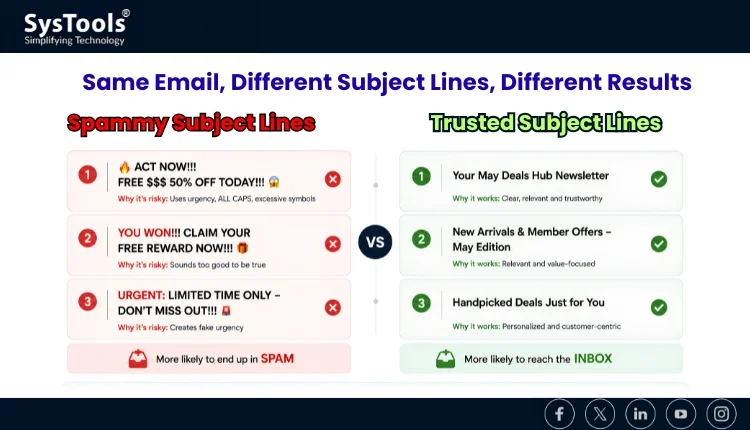
Action Items
Write subject lines that are honest – It should never be clickbait or all caps.
Domain Usage – Use branded domain links instead of generic short links like bit.ly.
Keep HTML simple – Plain text emails with minimal formatting land in inboxes more reliably.
Proofread every email – Spelling errors are treated as a spam signal by Gmail’s AI.
Problem: Users Don’t Think about
Possibilities are some important emails are landing in spam. Gmail automatically deletes spam folder contents every 30 days. That means critical emails, attachments, and conversations can disappear permanently without any warning.
If you are a user who relies on Gmail for important communication, losing emails to spam and then losing them forever to auto-deletion is a real risk. The strategy should be to protect yourself and to crate a secured backup of your Gmail data so critical data should not be lost. Whether it lands in spam or in your trash, or your account runs into any issue.
Never Lose an Important Email Again
The Gmail email backup tool, lets you download and save all your Gmail folders inbox, spam, sent, everything directly to your desired external location. One simple and secured backup means your data is safe.
Wrapping Up
Learning how to stop emails from going to spam in Gmail boils down in some areas. Trust Gmail trusts senders with proper authentication, clean content, and positive user signals. User should build that trust step by step using the fixes above, and your emails will reach the inbox they deserve. While you are doing this create a backup of your Gmail data because 30-day auto-delete waits for no one.
Frequently Asked Questions
Q – Why do my emails keep going to spam even if I know the sender?
A – Gmail’s spam filter sometimes misclassifies emails based on the content patterns and sender reputation. The simple fix is to open the email in spam, click “Not Spam,” and add the sender to your contacts.
Q – What is the fastest way to stop emails from going to spam in Gmail?
A – The fastest way to stop emails going to spam is to:
- Authenticate your domain with SPF and DKIM.
- Avoid spam trigger words in your content.
- Ask your recipients to whitelist your email address.
